Install
Coxswain is one package, coxswain, and one command, cox. Install cox,
then let cox install set up the rest.
brew install ppfenning/coxswain/cox          # or: uv tool install --python 3.14 coxswain
cox install --team my-team
mkdir -p <workspace>/work <workspace>/runs <workspace>/intake <workspace>/cartridges
git -C <workspace> init
cartridge init my-team --cartridges-dir <workspace>/cartridges
cox setup doctor
<home> is the coxswain home: --home, else COXSWAIN_HOME, else
$XDG_DATA_HOME/coxswain, else ~/.local/share/coxswain. <workspace> is
<home>/workspaces/main unless you pass --workspace.
When the home has no checkout, cox install clones one at the release tag
matching its own version into <home>/installs/coxswain, then reads
manifest.toml from it. That checkout is the whole install: there is one,
with one venv.
The doctor that cox install runs at its close may report the missing
workspace and cartridge until the mkdir, git init and cartridge init
steps are done.
Getting cox
Homebrew (macOS, and Linux with Homebrew):
brew install ppfenning/coxswain/cox
Current Homebrew refuses a formula from a third-party tap until you trust the
tap. If it does, run brew trust ppfenning/coxswain once and install again.
The formula also installs towpath, the dashboard.
uv:
uv tool install --python 3.14 coxswain
uv must already be on your PATH; get it from https://docs.astral.sh/uv/.
The --python 3.14 flag makes uv fetch a 3.14 interpreter when none is
present. Add the extras the machine uses, for example
uv tool install --python 3.14 'coxswain[postgres,traces,lake]'. A shared
Postgres store needs postgres. The extras are traces, postgres,
parquet, lake, analytics and live; cox install keeps the ones the
tool already has. If your shell cannot find cox afterwards, run
uv tool update-shell and open a new shell.
What cox install does
- Reads
manifest.tomlin the checkout of ppfenning/coxswain at<home>/installs/coxswain. It refuses a checkout with uncommitted changes, and refuses a--providerthat the manifest does not marksupported. A clean checkout is installed as it is; moving it to another release iscox upgrade's job. - Creates one venv in that checkout,
<checkout>/.venv, withuv sync. - Installs
coxeditable from the checkout, socoxand the harness run the same code. - Writes the profile for this machine,
~/.config/agent-tools/profile.yaml, when it has none:harness_diris<checkout>/src/graphs,skills_rootsis<checkout>/src/cartridges/skills-plugins, andprovider_profileis the shipped default,<checkout>/src/cartridges/providers/claude-code.yaml. See The provider profile for pointing it at your team's own. - Links the crew seats from
<checkout>/crewinto~/.claude/agents. - Fetches dash when you pass
--with dash. Dash is the only optional component; it lives in its own repository. - Runs
cox setup doctor. It also checks that the--providerCLI (claudeby default) is onPATH.
Channels
| Channel | The checkout follows | Command |
|---|---|---|
| release | the release tag vYYYY.M.N |
cox install |
| edge | main |
cox install --edge |
Flags
Run cox install --help for the flags your version accepts. The ones this
page uses:
| Flag | Meaning |
|---|---|
--team |
Which team's cartridge the profile names. |
--workspace |
The workspace the crew works in; <home>/workspaces/main by default. Required with --root. |
--home |
Absolute path of the coxswain home, used when --root is omitted. |
--root |
Use the checkout at <root>/coxswain instead of <home>/installs/coxswain. |
--provider |
Which provider in manifest.toml to install for; claude-code by default, and only a supported one is accepted (see Providers). |
--with dash |
Also install dash (towpath). |
--edge |
Follow main instead of the release tag. |
--dry-run |
Print the plan and change nothing. |
Verify
cox setup doctor
cox setup doctor checks the checkout, its venv, the profile and the home,
and that the configured provider's CLI is on PATH.
What you'll see

cox versions lists the checkout's release, and dash's tag when dash is
installed, against manifest.toml.
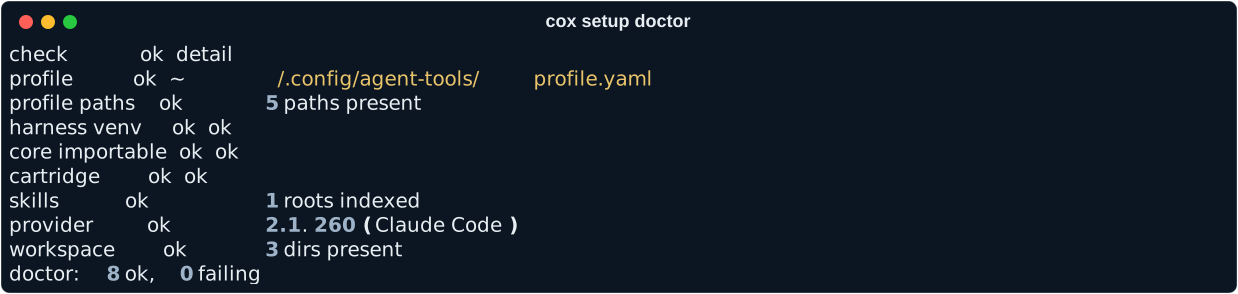
cox setup doctor against a real install.
The provider profile
A provider profile is team configuration: which CLI drives the seats, the
model, effort and budget for each tier and role, the tools each role may
call, and the shared store and trace locations (storage_url,
traces_url, lake_url, object_store). The checkout ships default profiles in
<checkout>/src/cartridges/providers/, and cox install points this
machine at claude-code.yaml there. That is enough for one person trying
Coxswain.
A team keeps its own profile outside the code checkout, so cox upgrade
never touches it and the checkout stays clean. Put it in one of two places:
<home>/providers/<team>.yaml, one copy per machine;- the workspace, for example
<workspace>/providers/<team>.yaml, so it travels with the workspace's git history.
Start from the shipped one, and copy catalog.yaml beside it (prices are
read from the catalog.yaml next to the profile):
mkdir -p <home>/providers
cp <home>/installs/coxswain/src/cartridges/providers/claude-code.yaml <home>/providers/my-team.yaml
cp <home>/installs/coxswain/src/cartridges/providers/catalog.yaml <home>/providers/
Then set provider_profile in ~/.config/agent-tools/profile.yaml to
that path, or pass --provider-profile PATH to cox setup install. The
doctor's home paths row fails when provider_profile sits outside both
<home> and the workspace.
Personal setup never goes in the code checkout. It lives in three places:
- The team cartridge, in
<workspace>/cartridges/<team>, holds the cast, the policy, the inline repos and the context packs. - The provider profile holds the tiers, budgets, tools and the store.
- The machine profile,
~/.config/agent-tools/profile.yaml, holds this machine's paths, the forge and tracker, the operator (operator:) and the notifier (notify:).
Upgrade
Update cox itself, then the checkout:
brew upgrade cox            # or: uv tool upgrade coxswain
cox upgrade
cox upgrade moves the checkout to the newest release tag (or --to
VERSION), syncs its venv, reinstalls cox from it with the extras it had,
relinks the crew, moves dash if you have it, and runs the doctor. It refuses
a checkout with uncommitted changes.
Moving from 0.47 or earlier
A machine installed with 0.47.0 or earlier has a checkout per component. Move
it to the one-checkout layout with cox setup migrate; see
From 0.47 to the monorepo.
Uninstall
There is no cox uninstall yet. Remove cox with brew uninstall cox or
uv tool uninstall coxswain, then delete the coxswain home (or --root) by
hand.
See Supported machines for prerequisites on specific platforms.